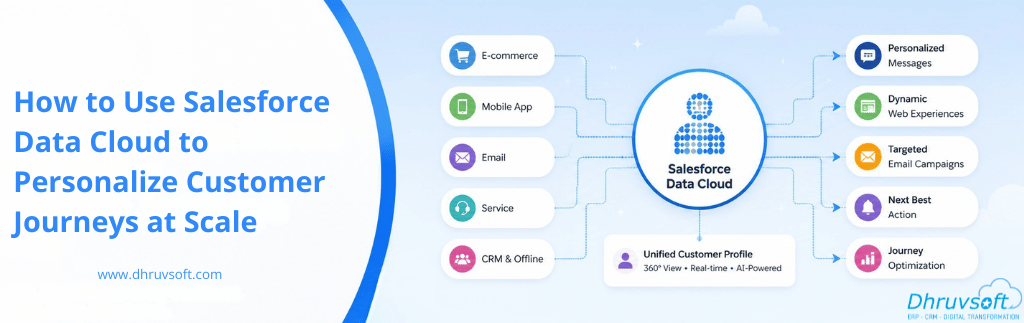
Think about the last time you received a message from a company that felt genuinely relevant — one that acknowledged where you were in your relationship with that brand, offered something that actually matched what you needed at that moment, and came through the right channel at the right time. That experience is rare. And for most businesses, it remains rare not because of a lack of intent but because of a fundamental data problem.
Customer data in most organizations lives in silos. Purchase history sits in an ERP. Support interactions are in a helpdesk. Web behavior is logged in an analytics platform. Email engagement is tracked in a marketing tool. CRM holds account and opportunity records. Each of these systems knows a fragment of the customer story. But no single view exists that brings all those fragments together in real time — and without that unified view, personalization at scale is simply not possible.
Salesforce Data Cloud is the platform built to solve exactly this problem. It is Salesforce’s real-time customer data platform (CDP) that ingests, harmonizes, and activates customer data from across every system your organization uses, creating unified customer profiles that power genuinely intelligent, personalized experiences across every touchpoint.This article explains what Salesforce Data Cloud is, how it works technically and strategically, and how your marketing, sales, and service teams can use it to deliver personalized customer journeys at a scale that was previously only available to the largest enterprises in the world.
What Is Salesforce Data Cloud?
Salesforce Data Cloud — formerly known as Salesforce Customer Data Platform (CDP) and, earlier, Salesforce Genie — is a real-time data platform natively built into the Salesforce platform. Unlike third-party CDPs that require complex integration work, Data Cloud is designed as the data foundation layer for all of Salesforce’s clouds: Sales Cloud, Marketing Cloud, Service Cloud, Commerce Cloud, and Experience Cloud.
At its core, Data Cloud does three things:
- It ingests structured and unstructured data from any source — Salesforce products, external databases, mobile apps, websites, IoT devices, data warehouses, and third-party marketing tools.
- It harmonizes that data using a canonical data model, resolving identity across sources to create a single, unified customer profile for each individual.
- It activates that data in real time to drive actions across marketing journeys, sales workflows, service interactions, and digital experiences.
The result is what Salesforce calls a “Customer 360” — a live, continuously updated profile of every customer that every team in your organization can act on. Not a report you run weekly. Not a data export you share between departments. A live, query-able profile that updates as customer behavior happens.
How Salesforce Data Cloud Works: The Architecture
Understanding how to use Data Cloud effectively starts with understanding how it is structured. The platform operates through five sequential layers.
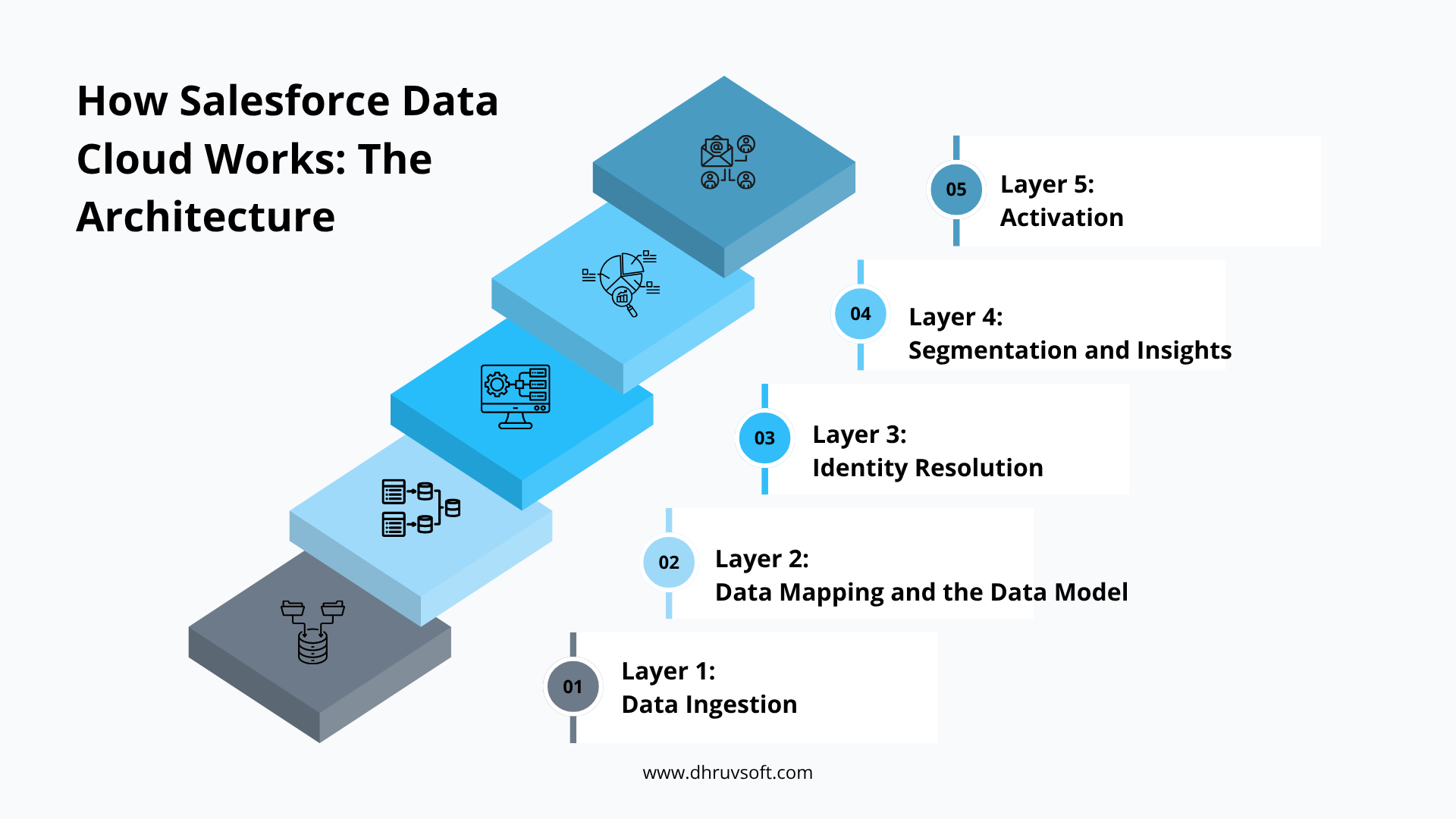
Layer 1: Data Ingestion
Data Cloud connects to data sources through native connectors, APIs, and ingestion streams. Native connectors exist for Salesforce Sales Cloud, Marketing Cloud, Commerce Cloud, and Service Cloud — meaning data from these products flows into Data Cloud without custom integration work. For external systems, Data Cloud supports MuleSoft connectors, Salesforce’s own ingestion API, and pre-built connectors for platforms like Google Analytics, AWS S3, Snowflake, Azure, and more.
Data can be ingested in two modes: batch (scheduled syncs of historical data) and streaming (real-time event data, such as website clicks, app interactions, or transaction events). Both modes feed into the same unified profile layer.
Layer 2: Data Mapping and the Data Model
Raw ingested data is mapped to Data Cloud’s canonical data model, which organizes data into standardized objects: Individual, Contact Point, Engagement, Party Identification, and so on. This standardization is what makes cross-source identity resolution possible. When a CRM contact record, a marketing email subscriber, and an e-commerce account all map to the same Individual object, Data Cloud can begin connecting them.
Layer 3: Identity Resolution
Identity resolution is the process of determining that multiple records across multiple systems belong to the same real person. Data Cloud uses matching rules — based on email address, phone number, device IDs, loyalty identifiers, or custom keys — to reconcile fragmented records into a single Unified Individual profile. This is the heart of what makes Data Cloud different from simply having data in multiple systems. The unified profile is not a copy — it is a live, continuously updated synthesis of all source records.
Layer 4: Segmentation and Insights
Once unified profiles exist, Data Cloud allows you to build real-time segments — audiences defined by any combination of attributes, behaviors, and engagement signals. These segments are dynamic: as a customer’s profile updates, they automatically enter or exit segments in real time. You can segment by purchase history, product affinity, engagement recency, predicted lifetime value, service interaction sentiment, or any custom attribute you have ingested.
Data Cloud also surfaces calculated insights — derived metrics computed across the customer profile, such as total purchase value, days since last interaction, or churn risk score — that can be used as segment criteria or passed downstream for activation.
Layer 5: Activation
Data and segments from Data Cloud are activated across Salesforce products and external destinations. A segment can be pushed to Marketing Cloud for a targeted email or SMS campaign, surfaced in Sales Cloud so a sales rep sees it on an account page, used in Service Cloud to route a support case, or exported to a paid advertising platform for audience targeting. Activation is real time — as segment membership changes, downstream systems are updated immediately.
Five Ways to Use Data Cloud for Personalized Customer Journeys
The architecture is powerful, but what matters most is what your teams can actually do with it. Here are the five highest-impact ways organizations are using Salesforce Data Cloud to personalize customer journeys at scale.
1. Real-Time Triggered Marketing Journeys
Traditional marketing automation operates on a schedule. You set up a drip sequence, and everyone who enters a segment gets the same cadence of messages over the same timeframe. Data Cloud changes this by allowing Marketing Cloud journeys to trigger on real-time behavioral events.
When a customer abandons a high-value product page, that event streams into Data Cloud and immediately triggers a journey entry — not in the next batch sync, but within seconds. The message they receive is informed by their unified profile: their purchase history, their segment membership, their preferred channel, and their engagement timing. The experience feels responsive rather than automated.
This is especially powerful for high-intent moments: cart abandonment, price drop events, product restock alerts, renewal reminders, or post-purchase cross-sell opportunities. Connecting these moments to a complete customer profile means the message can be personalized beyond a simple product reminder.
2. Next Best Action for Sales Teams
Sales Cloud users can see Data Cloud insights and segment memberships directly on account and contact records. This means a sales representative looking at an account page sees not just the standard CRM data, but a live view of that customer’s recent digital engagement, product usage signals, support interactions, and predictive scores.
Einstein’s Next Best Action, powered by Data Cloud signals, can surface specific recommendations directly in the Sales Cloud interface: which product to discuss, which renewal risk to flag, and which upsell opportunity has the highest probability of success based on behavior across all touchpoints. Sales reps move from acting on historical CRM data to acting on a complete, real-time picture of each customer relationship.
3. Personalized Service Experiences
When a customer contacts your support team, the service agent’s view of that customer should be complete — not limited to the last few support tickets. With Data Cloud connected to Service Cloud, an agent handling an inbound case can see the customer’s recent purchase activity, their digital engagement, their segment membership, their loyalty tier, and any predictive scores that indicate, for example, that this customer is at risk of churning if the issue is not resolved positively.
This context transforms service interactions. An agent who knows that the caller just made their third purchase and is in your high-value segment will handle the interaction differently — and more effectively — than one who only sees a case history. Data Cloud makes that context automatically available without requiring the agent to search multiple systems.
4. Web and App Personalization
Data Cloud connects to Salesforce’s personalization engine, formerly known as Interaction Studio, to power real-time website and mobile app personalization. Visitor behavior on your digital properties is streamed into Data Cloud, enriching the unified profile in real time. That profile then drives personalized content recommendations, dynamic banner messaging, and tailored product listings for each visitor.
For returning customers who are identified through login or cookie recognition, personalization is driven by their full profile — including offline purchase history, service history, and CRM data. For anonymous visitors, personalization is driven by session behavior and contextual signals until identity is established. The transition from anonymous to known visitor happens seamlessly, with the profile updating as identity resolves.
5. Paid Media and Advertising Audience Sync
One of the most immediately measurable applications of Data Cloud is in paid advertising. By syncing Data Cloud segments directly to advertising platforms — Google Ads, Meta, LinkedIn, and others — your paid media audiences are automatically kept current based on live customer data.
Rather than uploading a static customer list every few weeks, your advertising audiences update continuously. A customer who just made a purchase is automatically removed from your acquisition audiences and added to your upsell audiences. A prospect who has entered a high-intent segment based on web behavior is automatically added to a re-targeting audience. This level of audience precision typically improves ad spend efficiency, particularly for businesses running large-scale paid programs.
Key Capabilities and Features at a Glance
| Capability | What It Enables |
|---|---|
| Real-time data ingestion | Profiles update within seconds of a customer event. |
| Identity resolution | Single unified profile across all data sources. |
| Dynamic segmentation | Audiences that update automatically as customer data changes. |
| Calculated insights | Custom metrics such as LTV, engagement score, and churn risk. |
| Marketing Cloud activation | Real-time journey triggers based on live profile data. |
| Sales Cloud integration | Next Best Action and profile signals on CRM records. |
| Service Cloud integration | Full customer context for support agents. |
| Personalization engine | Dynamic web and app content based on unified profiles. |
| Ad audience sync | Live segment export to paid media platforms. |
| Data sharing with Snowflake | Zero-copy data sharing for analytics and BI workloads. |
Data Cloud and Einstein AI: The Predictive Layer
Data Cloud becomes significantly more powerful when combined with Salesforce Einstein, Salesforce’s AI layer. Einstein models trained on Data Cloud’s unified profiles go beyond descriptive analytics (what did this customer do) to predictive intelligence (what will this customer do next).
Einstein Prediction Builder allows you to create custom predictive models on top of Data Cloud data — for example, a propensity model that scores every customer in your database for likelihood to purchase a specific product in the next 30 days, or a churn risk model that identifies accounts at risk of non-renewal before any explicit signal of dissatisfaction appears.
These prediction scores are stored as calculated insights in the Data Cloud profile and can be used as segmentation criteria, journey triggers, or sales intelligence signals. A business running Einstein churn predictions on a Data Cloud foundation can route at-risk accounts to a proactive retention program automatically, without a data analyst pulling a weekly list or a manager manually triaging accounts.
With the introduction of Salesforce Einstein Copilot and Agentforce, Data Cloud’s unified profiles are also becoming the contextual foundation for AI-powered sales and service agents that can hold contextually aware conversations with customers — drawing on a complete customer history rather than operating from a fragmented or stale data snapshot.
Implementation Considerations: What to Plan For
Salesforce Data Cloud is a powerful platform, but implementations that deliver rapid business value require careful planning. As a Salesforce Crest Partner, here are the key considerations we guide organizations through before beginning a Data Cloud project.
Data Source Inventory and Readiness
The value of Data Cloud is proportional to the quality and breadth of data you connect to it. Before implementation begins, it is worth conducting a thorough inventory of your data sources: what systems hold customer data, what identifiers each system uses, what the data quality looks like, and how frequently data in each system is updated. This exercise often surfaces data quality issues that need to be addressed before they are carried into the unified profile.
Identity Resolution Strategy
Defining how identity resolution works in your environment is a critical design decision. Which identifiers are considered primary keys? How do you handle cases where the same email address exists in multiple systems with conflicting records? What is the policy for merging profiles when there is partial identity overlap? These decisions shape the quality of unified profiles and need to be made deliberately rather than by default.
Use Case Prioritization
The full surface area of Data Cloud capabilities is large. Attempting to activate everything simultaneously leads to slow, unfocused implementations. The most successful projects start with one or two high-value use cases — often real-time marketing triggers or sales intelligence — prove value quickly, and then expand in phases. Prioritizing use cases by potential business impact and implementation simplicity gets you to value faster.
Governance and Consent Management
Centralizing customer data creates data governance responsibilities. Organizations need to ensure that consent preferences are captured, stored in the Data Cloud, and respected across all activation channels. A customer who has opted out of marketing communications in one system must have that preference honored when Data Cloud activates their profile across every connected channel. Building consent management into the implementation from day one avoids expensive remediation later.
Final Thoughts: The Competitive Advantage Is in the Data
Personalization at scale is not a creative challenge. It is a data infrastructure challenge. The businesses delivering the most relevant, responsive customer experiences are not necessarily the ones with the most talented marketing teams — they are the ones whose marketing, sales, and service functions are operating from a complete, unified, real-time view of each customer.
Salesforce Data Cloud is the infrastructure that makes that possible within the Salesforce ecosystem. It removes the silos that prevent genuine personalization, activates customer data across every channel simultaneously, and brings AI-powered intelligence to bear on every customer interaction.
For organizations already invested in Salesforce, Data Cloud is the missing layer that connects their existing tools into a genuinely unified customer experience platform. For organizations evaluating their CRM and data strategy, it represents a compelling reason to consolidate around the Salesforce ecosystem.
The competitive advantage in the next five years will belong to the businesses that know their customers best — in real time, across every interaction, at scale. Salesforce Data Cloud is how that advantage is built.
Frequently Asked Questions
Is Salesforce Data Cloud the same as a traditional CDP?
Not exactly. Traditional customer data platforms typically sit as a separate system that integrates with your CRM and marketing tools after the fact. Data Cloud is built natively into the Salesforce platform, so it shares a common data model with Sales Cloud, Marketing Cloud, Service Cloud, and Commerce Cloud rather than connecting to them as external systems.
Do we need to already use multiple Salesforce clouds to benefit from Data Cloud?
No. Data Cloud can ingest data from non-Salesforce sources — data warehouses, third-party marketing tools, e-commerce platforms, and more — so it adds value even for organizations running a single Salesforce cloud alongside other systems. That said, the more Salesforce clouds you use, the more of that integration comes out of the box.
How long does a typical Data Cloud implementation take?
first phase. A focused first phase connecting a handful of priority data sources and activating one or two high-value use cases moves faster than a broad rollout across every Salesforce cloud at once. Most organizations see a meaningfully faster time-to-value by phasing the rollout rather than attempting to activate the full platform in a single release.
Does Data Cloud replace our existing data warehouse or analytics platform?
Not necessarily. Data Cloud is built for real-time activation of customer profiles across marketing, sales, and service touchpoints, whereas a data warehouse is typically optimized for broader analytics and reporting workloads. Many organizations run both, and Data Cloud’s zero-copy sharing with platforms like Snowflake is designed specifically to support that coexistence rather than force a replacement.
What is the first step in a Data Cloud project?
The strongest starting point is a discovery phase that inventories your data sources, defines your identity resolution strategy, and prioritizes one or two high-value use cases rather than attempting to activate the full platform at once.
Talk to Our Salesforce Data Cloud Team
If you are exploring how Data Cloud can unify your customer data and power personalization at scale, we can help you assess your readiness, define a phased implementation roadmap, and deliver results.
Contact us for a free consultation
About Dhruvsoft
Dhruvsoft is a Salesforce Crest Partner with over 15 years in business, 200+ Salesforce projects delivered, and 50+ certified consultants serving 100+ clients across seven industries worldwide. Our team has hands-on expertise implementing Salesforce Data Cloud, Marketing Cloud, Sales Cloud, and Service Cloud for businesses globally.
Our approach to Data Cloud projects follows a structured methodology that prioritizes business outcomes over technical completeness. We begin with a discovery engagement that maps your current data landscape, identifies your highest-value personalization use cases, and defines the Data Cloud architecture that fits your environment. We design identity resolution configurations tailored to your specific data sources and identifier ecosystem. We build and test activation workflows across the Salesforce clouds your teams use — Marketing Cloud, Sales Cloud, Service Cloud, or Commerce Cloud — and we train your marketing operations, sales enablement, and IT teams to manage and expand the platform over time.
We also help businesses plan their broader Salesforce strategy in the context of Data Cloud. For organizations using Salesforce CRM alongside Marketing Cloud or Service Cloud, Data Cloud is the integration layer that makes those investments work together more intelligently. For businesses evaluating whether to expand their Salesforce footprint, Data Cloud is often the capability that makes the business case compelling.
 About Ashish Manuka


