A practical guide to Salesforce implementation timelines, project complexity, and the factors that affect time to go-live
Ask five different companies how long their Salesforce implementation took, and you will likely get five very different answers. Salesforce implementation timelines vary enormously from business to business, and company size alone does not determine how long a project will take. A twenty-person startup with three integrations and messy legacy data can take longer than a fifty-person company with clean records and a simple Sales Cloud rollout.
What actually drives the timeline is a combination of factors: the number of users, the complexity of your business processes, how many systems need to talk to Salesforce, the state of your data, and how much customization your team expects. Setting realistic expectations on these factors before the project begins is one of the biggest predictors of Salesforce project success.
This guide walks through what businesses should expect from discovery through go-live, breaks down typical timelines by business size and by project phase, and explains what speeds a project up and what slows it down. As a Salesforce Partner with over 15 years in business and 200+ Salesforce projects delivered, the goal of this guide is to help you plan a Salesforce implementation around your actual requirements rather than a generic promise.
It also matters because how you plan your timeline affects how you plan everything else: budget, staffing, internal communications, and the timing of other business initiatives that may depend on Salesforce being live. A well-informed timeline expectation, set early with your implementation partner, keeps the entire project grounded in reality from day one.
What Determines the Salesforce Implementation Timeline?
- Business Size and Number of Users: Small businesses with simple, single-team sales processes typically implement faster than mid-sized businesses running multiple teams and workflows, which in turn move faster than large enterprises with complex organizational structures spanning several business units.
- Scope of the Salesforce Project: A single-cloud Sales Cloud implementation is a very different project from a multi-cloud rollout spanning Sales Cloud, Service Cloud, Marketing Cloud or Account Engagement, Revenue Cloud or CPQ, and Experience Cloud. Each additional cloud adds its own configuration, testing, and training requirements.
- Business Process Complexity: A simple, linear sales process configures quickly. Multiple sales pipelines, territory and approval structures, complex case management, and custom business rules all add design and build time, since each variation needs to be mapped, configured, and tested.
- Data Migration Requirements: Timelines are directly affected by the number of records being migrated, how much cleansing is required, how duplicate records are handled, whether historical data needs to be preserved, and the complexity of migrating out of a legacy CRM.
- Integration Requirements: Connecting Salesforce to ERP systems, marketing automation platforms, finance and accounting software, customer support tools, and other third-party applications or APIs is often the single biggest variable in a project timeline, particularly when real-time data synchronization is required.
Integrations are also one of the hardest elements to estimate accurately at the start of a project, since the true complexity of a connected system’s data structure and API limitations often only becomes clear once technical teams start building against it. Experienced implementation partners build in discovery time specifically to surface these risks before they affect the broader schedule.
Typical Salesforce Implementation Timeline by Business Size
Small Businesses: Typical Timeline 4-8 Weeks
- Basic Salesforce Sales Cloud implementation with core sales features and standard setup
- Limited number of users with straightforward user access and role configuration
- Standard Salesforce functionality with minimal customization to meet basic business requirements
- Minimal integrations with only essential external systems or applications
- Simple data migration involving standard records and basic data cleansing
- Basic reports and dashboards to support standard sales tracking and performance monitoring
Mid-Sized Businesses: Typical Timeline 8-16 Weeks
- Multiple departments using Salesforce with shared processes, collaboration, and department-specific requirements
- Customized sales processes designed to support different business needs and sales workflows
- Several integrations with existing business systems to enable seamless data exchange and improved connectivity
- Larger data migration effort
- Advanced automation using Flow and approval processes
- Custom dashboards and reporting
Large Enterprises: Typical Timeline 4-9+ Months
- Multiple Salesforce clouds implemented together or in phases
- Complex integrations across many systems
- Large-scale data migration from multiple sources, including data cleansing, transformation, mapping, validation, and reconciliation
- Multiple business units or regions
- Advanced security and governance requirements, including sophisticated access controls, compliance standards, data protection, and governance policies
- Extensive customization and phased deployment
Important: these are planning ranges, not guarantees. A small business with complex integrations can take longer than a larger company with a straightforward scope. Scope and complexity matter more than headcount alone.These ranges are meant as planning benchmarks to help you have an informed conversation with your implementation partner, not as commitments a project must hit regardless of what discovery uncovers. Any credible partner will refine these estimates once they understand your specific data, process, and integration landscape.
Salesforce Implementation Timeline: Phase by Phase
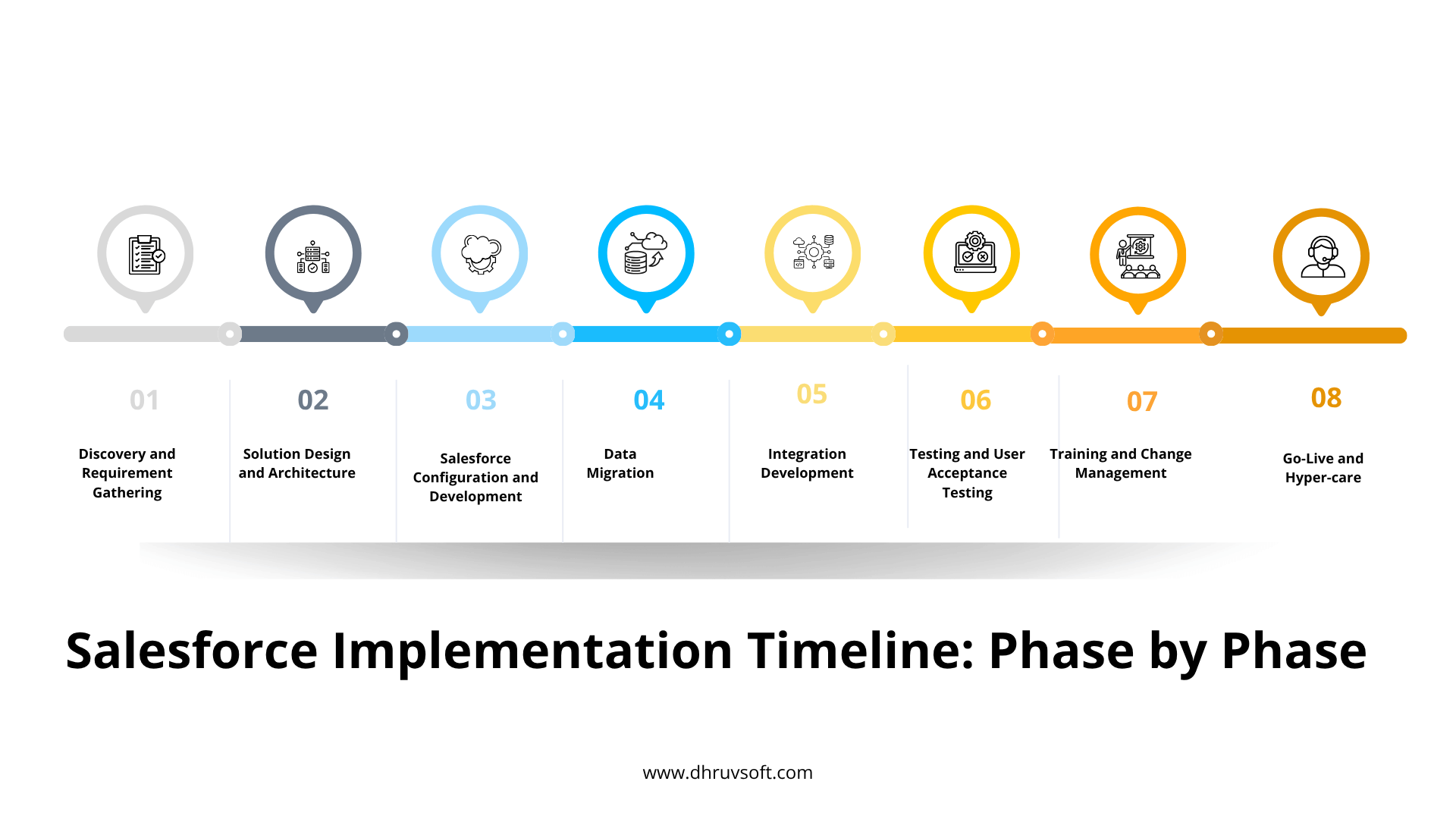
- Discovery and Requirement Gathering (1-3 weeks): This phase covers stakeholder interviews, business process discovery, pain-point identification, defining Salesforce requirements, and locking the project scope. It is the foundation on which every later phase depends.
- Solution Design and Architecture (1-3 weeks): The implementation partner defines the Salesforce architecture, data model, security model, integration strategy, and automation requirements before any configuration begins.
- Salesforce Configuration and Development (2-8+ weeks): This phase covers building objects and fields, configuring sales processes, building workflows and Flows, setting up approval processes, and any custom development required beyond standard configuration.
- Data Migration (1-4+ weeks): Data migration involves extraction, cleansing, transformation, mapping, a test migration, and the final migration into production. Poor data quality is one of the most common reasons this phase runs long.
- Integration Development (2-8+ weeks): This includes ERP integration, marketing integrations, API development, middleware configuration, and data synchronization testing between Salesforce and connected systems.
- Testing and User Acceptance Testing (1-3 weeks): Functional testing, integration testing, security testing, user acceptance testing, and defect resolution all happen here before the solution is considered ready for go-live.
- Training and Change Management (1-2 weeks): Role-based training, user documentation, Salesforce adoption planning, and enabling internal super-users prepare the organization to actually use what has been built.
- Go-Live and Hyper-care (1-2 weeks): The final phase covers production deployment, data validation, active user support, issue resolution, and performance monitoring in the days and weeks immediately following launch.
Salesforce Implementation Timeline Comparison Table
| Business Profile | Typical Timeline | Common Scope |
| Small Business | 4-8 weeks | Sales Cloud, basic automation, limited data migration |
| Mid-Market | 8-16 weeks | Multiple teams, several integrations, custom workflows |
| Large Enterprise | 4-9+ months | Multi-cloud, complex integrations, large-scale data migration |
| Global / Complex Transformation | 9-18+ months | Multiple regions and entities, several clouds, extensive integrations |
Implementation Timeline by Phase, at a Glance
| Implementation Phase | Typical Duration |
| Discovery and requirement gathering | 1-3 weeks |
| Solution design and architecture | 1-3 weeks |
| Salesforce configuration and development | 2-8+ weeks |
| Data migration | 1-4+ weeks |
| Integration development | 2-8+ weeks |
| Testing and user acceptance testing | 1-3 weeks |
| Training and change management | 1-2 weeks |
| Go-live and hyper-care | 1-2 weeks |
What Can Make a Salesforce Implementation Faster?
- Clear Project Scope: Defined requirements, controlled customization, and clear project ownership prevent the back-and-forth that slows projects down.
- Strong Executive Sponsorship: An engaged sponsor enables faster decisions and better cross-functional alignment when trade-offs need to be made.
- Clean and Ready Data: Clean data means less migration preparation and fewer validation issues, which shortens one of the least predictable phases of any project.
- Using Salesforce Best Practices: Favoring configuration over customization and using standard Salesforce functionality wherever possible reduces build time and long-term maintenance.
- AI driven Salesforce implementation: Use of Artificial Intelligence (AI) to shorten the implementation timeline.
- An Experienced Salesforce Implementation Partner: An experienced partner delivers faster solution design, reduces rework, and manages risk proactively rather than reactively.
What Can Delay a Salesforce Implementation?
- Scope Creep: New requirements appearing midway through the project are one of the most common causes of missed deadlines.
- Poor Data Quality: Duplicate and incomplete records, along with unstructured legacy data, extend the data migration phase significantly.
- Complex Integrations: Multiple third-party systems and real-time synchronization requirements add development and testing time that is easy to underestimate.
- Lack of Stakeholder Availability: Delayed decisions and slow requirement approvals stall progress even when the technical work is ready to proceed.
- Excessive Customization: Rebuilding capabilities Salesforce already offers out of the box increases both testing and long-term maintenance requirements.
- Poor User Adoption Planning: Late-stage resistance and last-minute additional training requirements often surface when change management is treated as an afterthought.
How to Build a Realistic Salesforce Implementation Plan
Define the MVP: Prioritize the essential capabilities needed for initial go-live rather than trying to deliver every possible feature in the first release.
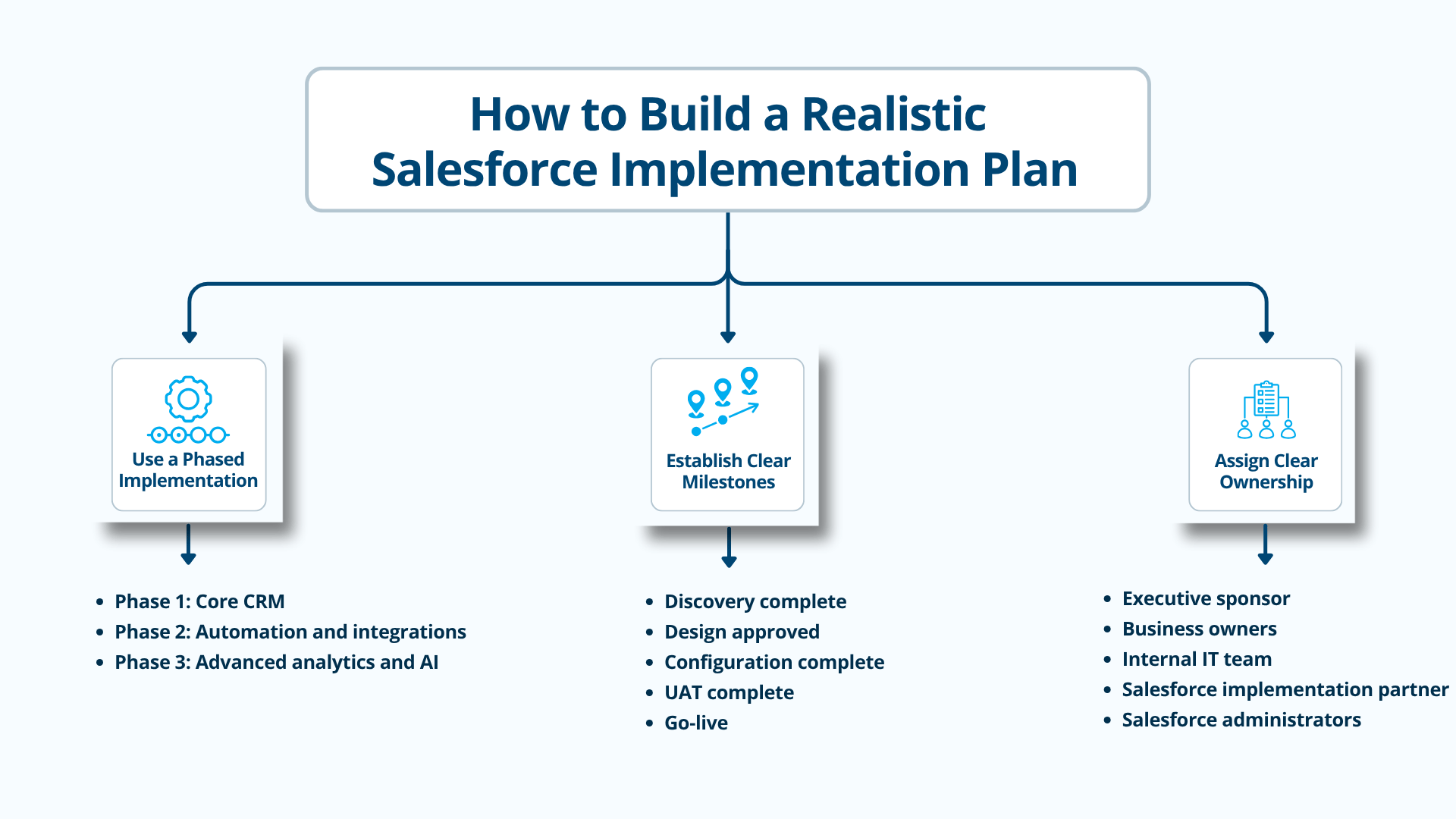
Use a Phased Implementation
- Phase 1: Core CRM
- Phase 2: Automation and integrations
- Phase 3: Advanced analytics and AI
Establish Clear Milestones
- Discovery complete
- Design approved
- Configuration complete
- UAT complete
- Go-live
Assign Clear Ownership
- Executive sponsor
- Business owners
- Internal IT team
- Salesforce implementation partner
- Salesforce administrators
Should You Choose a Big-Bang or Phased Salesforce Implementation?
- Big-Bang Approach: The entire Salesforce scope goes live at once. This can work well for smaller, well-scoped projects, but it carries higher risk for larger organizations since every process and integration must work correctly from day one.
- Phased Approach: Capabilities are deployed in stages. This lowers implementation risk, delivers faster initial value, and generally makes user adoption easier since teams are not learning an entirely new system all at once.
- Which Approach Is Better: The right approach depends on your organization’s size, process complexity, risk tolerance, and business urgency. Smaller, simpler projects often suit a big-bang launch, while larger or higher-risk projects generally benefit from a phased rollout.
How to Avoid Losing Momentum During Implementation
- Keep business teams involved throughout the project, not just at kickoff and go-live
- Communicate milestones clearly so stakeholders know what to expect and when
- Deliver quick wins early to build confidence in the project
- Run pilot programs with a smaller user group before a full rollout
- Train users before go-live rather than after issues arise
- Maintain business continuity throughout the transition
- Establish post-go-live support so issues are resolved quickly, not left to accumulate
Case Study: Salesforce Implementation Timeline
Business Scenario
A mid-sized organization with 150 Salesforce users needed to implement Sales Cloud and Service Cloud together, integrate with their existing ERP system, and migrate data out of a legacy CRM.
Salesforce Implementation Roadmap
- Weeks 1-2: Discovery
- Weeks 3-4: Solution design
- Weeks 5-9: Configuration and development
- Weeks 7-10: Data migration and integrations, run in parallel with the later configuration work
- Weeks 11-12: User acceptance testing
- Weeks 13-14: Training and go-live
Project Outcomes
- A controlled, fourteen-week implementation with no surprise extensions
- Minimal operational disruption during the transition
- Faster user adoption due to structured, role-based training
- A scalable Salesforce foundation ready for future phases
This case study demonstrates a common pattern we use when planning. In this project, we have executed data migration and integration work in parallel with later stages of configuration rather than strictly sequentially is one of the most effective ways experienced teams compress an overall timeline without cutting corners on quality.
Common Salesforce Implementation Mistakes
- Starting configuration before requirements are clear
- Underestimating the time data migration actually requires
- Ignoring integrations until late in the project
- Trying to implement everything at once instead of phasing the rollout
- Over-customizing Salesforce instead of using standard functionality
- Not involving end users early enough in the process
- Treating training as a final step rather than an ongoing part of the project
- Failing to plan for post-go-live optimization
Final Thoughts: Focus on the Right Timeline, Not the Fastest Timeline
Salesforce implementation timelines depend on scope and complexity far more than on business size alone. Small projects can go live within weeks, while enterprise transformations may reasonably take several months. Speed should never come at the expense of data quality, user adoption, security, or scalability.
A realistic roadmap, built around your actual requirements and delivered in well-planned phases, helps organizations achieve faster time-to-value while reducing implementation risk. The goal should be a successful Salesforce implementation, not simply a fast one.
Ultimately, the businesses that get the most value from Salesforce are not the ones that went live the fastest, but the ones that went live with a system their teams trust, their data is clean, and their processes were thoughtfully mapped rather than rushed. A realistic timeline is not a compromise; it is what makes a genuinely successful implementation possible.
Frequently Asked Questions
How long does a Salesforce implementation take?
It depends on scope and complexity, but as a general guide, small businesses typically take four to eight weeks, mid-sized businesses eight to sixteen weeks, and large enterprises four to nine months or more.
Can Salesforce be implemented in 30 days?
Yes, for a very simple, single-cloud implementation with minimal customization, clean data, and a small user base, a thirty-day timeline is achievable. Most projects with any integration or customization requirements need longer. Refer to our Salesforce Quickstart Implementation offerings for going live within 30 days.
How long does a Salesforce Sales Cloud implementation take?
A standalone Salesforce Implementation like Sales Cloud implementation typically takes four to twelve weeks depending on business size, process complexity, and the number of integrations involved.
How long does Salesforce data migration take?
Data migration can range from a few days for a small, clean dataset to several weeks or months for large, multi-source, or poor-quality legacy data.
What causes Salesforce implementation delays?
The most common causes are scope creep, poor data quality, complex integrations, limited stakeholder availability, excessive customization, and weak user adoption planning.
Is a phased Salesforce implementation better?
For most mid-sized and large organizations, yes. Phasing reduces risk, delivers value earlier, and makes user adoption easier compared to a single big-bang launch.
How much does business size affect Salesforce implementation time?
Business size matters, but scope and complexity matter more. A small business with several complex integrations can take longer than a larger business with a simple, well-scoped project.
Can a Salesforce partner reduce implementation time?
Yes. An experienced implementation partner brings proven methodology, faster solution design, and early risk identification, all of which reduce rework and keep the project on schedule.
Planning a Salesforce Implementation?
Dhruvsoft helps businesses plan, implement, migrate, integrate, and optimize Salesforce based on their business size, processes, and growth objectives.
Talk to our Salesforce experts to build a realistic implementation roadmap for your organization.
About Dhruvsoft
Dhruvsoft is a Salesforce Partner with over 15 years in business, 200+ Salesforce projects delivered, 50+ certified consultants, and 100+ clients served across seven industries. Every engagement follows the same disciplined approach, regardless of project size:
- Discovery First: Every engagement starts with understanding business objectives and processes before any configuration decisions are made.
- Right-Sized Implementation: We build according to your business size and complexity rather than applying a one-size-fits-all template.
- Agile Delivery: Regular demonstrations and feedback cycles keep stakeholders informed and let us course-correct early rather than late.
- Data and Integration Planning: Migration and integration strategy is defined from the beginning of the project, not bolted on once configuration is already underway.
- Adoption-Focused Deployment: Training, documentation, and change management are built into the project plan so the system is actually used once it goes live.
- Continuous Optimization: After go-live, we support post-launch improvements, automation, analytics, and ongoing managed Salesforce services so the platform keeps evolving with your business.
This full lifecycle approach, from initial discovery through post-launch optimization, is what separates a Salesforce implementation that delivers lasting value from one that simply goes live and stagnates. We treat go-live as the beginning of a partnership, not the end of a project.
 About Ritu Agarwal


