A step-by-step guide to planning, executing, and optimizing a successful CRM migration to Salesforce with minimal business disruption
At some point, most growing businesses hit a wall with their existing CRM. Reports take too long to build, sales and service teams work off different versions of the truth, and processes that once fit on a single spreadsheet now need real automation. These are the classic signs that a CRM has reached its limits, and they are exactly why so many companies begin evaluating a move to Salesforce.
Businesses migrate from HubSpot, Microsoft Dynamics, Zoho CRM, Pipedrive, Fresh-sales, and various legacy CRM systems for similar reasons: limited customization, weak reporting, poor scalability across departments, and a lack of deep integration with the other systems running the business. In many cases, the CRM was a good fit when the company was smaller, but it was never designed to support multiple departments, complex approval processes, or the volume of data a scaling business now generates.
The catch is that a CRM migration is a high-stakes project. Done without a plan, it can mean lost records, broken relationships between accounts and contacts, frustrated sales teams, and weeks of disrupted pipeline visibility. Sales reps who cannot find historical context on a customer lose credibility in front of that customer. Service teams that lose case history end up repeating questions customers have already answered. These are not small inconveniences; they show up directly in revenue, retention, and team morale.
Salesforce remains the platform of choice for businesses planning for scalable growth, thanks to its flexibility, its mature ecosystem of integrations, and its ability to support sales, service, and marketing on a single platform. It also offers a depth of customization, AI capability, and partner ecosystem that most point-solution CRMs simply cannot match as a business grows more complex. This guide walks through exactly how to migrate from HubSpot, or any other CRM, to Salesforce without losing data or business momentum along the way, so you can approach the project with a clear roadmap rather than guesswork.
When Is the Right Time to Migrate?
Business Growth Has Outpaced Your CRM
If your organization now has more users and departments relying on the CRM than it was originally set up for, if customer data volume has grown well beyond what the system comfortably handles, or if your sales and service processes have become too complex for your current tool, these are strong signals that it is time to consider a Salesforce CRM migration.
Need for Greater Automation
Many teams outgrow their CRM’s automation capabilities before they outgrow the CRM itself. Once you need advanced workflow automation, AI-driven insights into deals and customer behavior, or better collaboration across multiple departments, a more capable platform like Salesforce becomes necessary.
Integration Challenges
A CRM that cannot integrate cleanly with your ERP, marketing platforms, customer support systems, or other third-party applications creates data silos and manual work. When integration limitations start slowing the business down, migrating to a more extensible platform is usually the more sustainable path forward.
Common CRM Migration Challenges
Understanding the common pitfalls of a CRM migration up front makes it far easier to plan around them. Most migration failures trace back to one of the following six issues.
- Data Loss : Records can be dropped or corrupted during extraction, transformation, or load if the process is not carefully planned and validated at every step. This is often the single biggest fear businesses have going into a migration, and rightly so, since lost records can mean lost revenue history or broken customer relationships.
- Duplicate Records : Migrating data as-is, without deduplication, often carries years of duplicate contacts and accounts directly into the new system, undermining reporting accuracy and creating confusion for sales teams working the same account under two different records.
- Broken Relationships Between Objects : Losing the connections between accounts, contacts, and opportunities during migration can leave sales teams without the context they rely on daily, effectively erasing the relationship history that makes a CRM useful in the first place.
- User Resistance : Teams that are not involved early or trained properly often resist adopting the new system, undermining the return on investment regardless of how well the technical migration itself was executed.
- Business Downtime : Poorly sequenced migrations can interrupt access to active pipeline and customer data at exactly the wrong moment, stalling deals in progress and frustrating customer-facing teams.
- Poor Data Quality : Migrating incomplete, outdated, or inconsistent data simply moves old problems into a new system rather than solving them, and often makes those problems harder to fix once they are embedded in Salesforce’s data model.
Pre-Migration Assessment: Build a Migration Strategy
- Evaluate Your Current CRM: Before mapping anything to Salesforce, take stock of everything living in your current CRM, including:
- Contacts
- Companies or accounts
- Deals or opportunities
- Activities
- Tasks
- Custom objects
- Attachments
- Define Business Goals : A migration should be anchored to clear business goals rather than treated as a purely technical exercise. Be explicit about why you are migrating, what success will look like, and how the new platform needs to support the business as it scales.
- Identify Stakeholders : A successful migration requires input from every team that touches customer data, including sales, marketing, customer service, IT, and executive leadership. Involving these stakeholders early reduces surprises later and builds buy-in for the new system.
Salesforce Migration Roadmap
Once the pre-migration assessment is complete, the actual migration work follows a fairly predictable sequence. Skipping or rushing any of these steps is where most CRM migration problems originate, so it is worth treating each one as a distinct phase with its own checkpoint before moving forward.
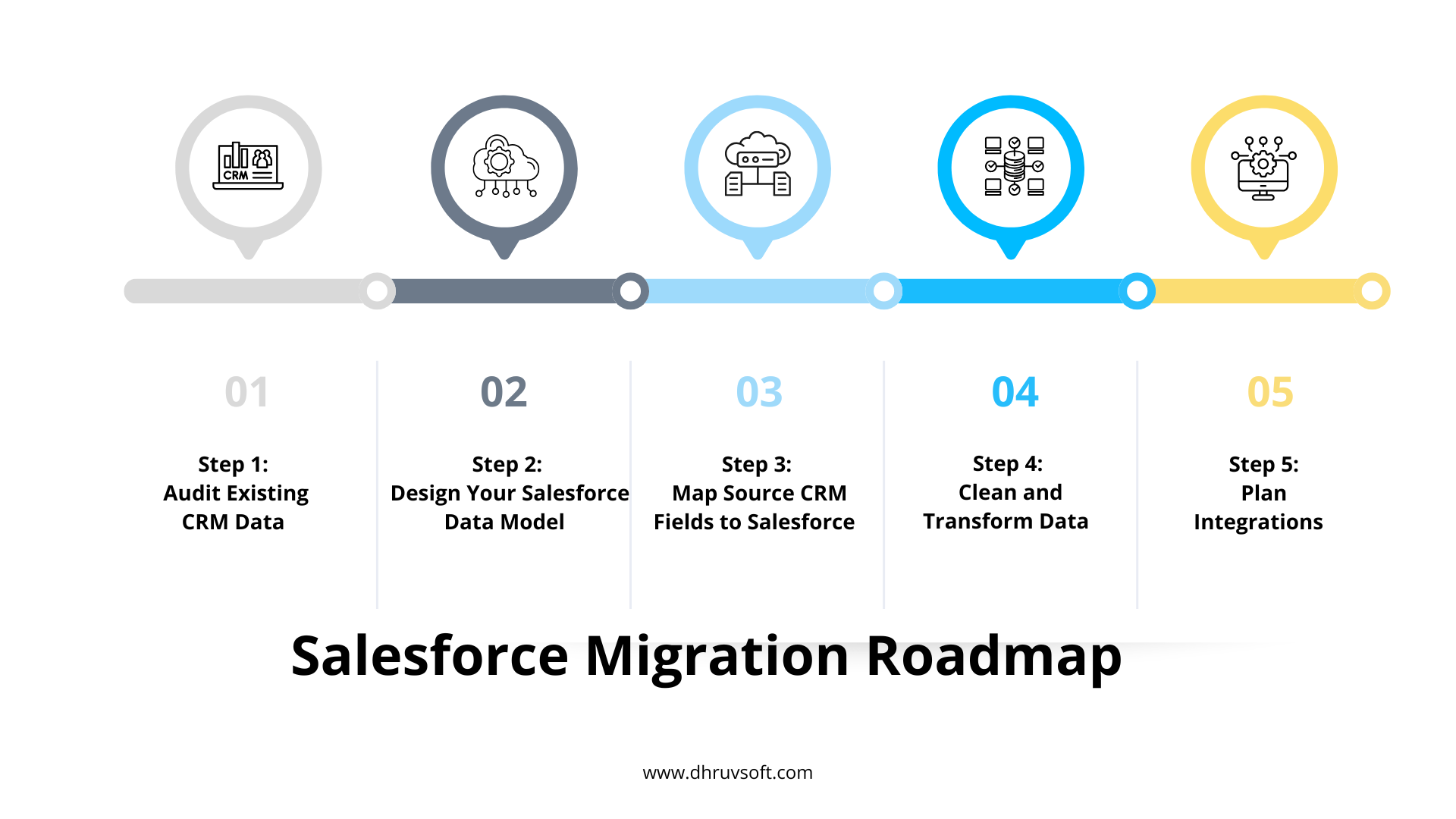
Step 1: Audit Existing CRM Data
Start by removing duplicates, archiving obsolete records, validating that mandatory fields are populated, and standardizing formats across the dataset. A clean starting point makes every later step easier.
Step 2: Design Your Salesforce Data Model
Define how your business will be structured in Salesforce, including accounts, contacts, leads, opportunities, cases, products, and any custom objects specific to your operations.
Step 3: Map Source CRM Fields to Salesforce
Carefully map standard fields, custom fields, picklists, relationships, and file attachments from your source CRM to their Salesforce equivalents. This is one of the most detail-intensive parts of any CRM data migration.
Step 4: Clean and Transform Data
Standardize naming conventions, normalize addresses, merge duplicate accounts, and validate email addresses before the data is loaded into Salesforce.
Step 5: Plan Integrations
Map out how Salesforce will connect with your ERP, marketing automation platform, email system, accounting software, customer support tools, and document management systems, so nothing breaks on go-live day.
CRM Data Mapping: What Needs to Be Migrated?
The table below outlines a typical field and object mapping when migrating from a CRM like HubSpot to Salesforce, along with the key considerations for each.
| Source CRM Data | Salesforce Object | Migration Considerations |
|---|---|---|
| Contacts | Contacts | Remove duplicates and validate email addresses. |
| Companies | Accounts | Standardize company hierarchy before migration. |
| Deals | Opportunities | Preserve sales stages, close dates, and opportunity values. |
| Leads | Leads | Retain lead source, ownership, and qualification status. |
| Tasks | Activities | Maintain activity timelines, due dates, and ownership. |
| Notes | Notes | Preserve historical notes and business context. |
| Emails | Activities | Retain communication history wherever possible. |
| Products | Products | Validate the product catalog, SKUs, and pricing before migration. |
| Custom Fields | Custom Fields | Review field necessity and optimize the data model. |
| Attachments | Files | Ensure files remain accessible and correctly linked after migration. |
Maintaining Data Integrity During Migration
- Preserve Relationships : Account-contact associations, opportunity ownership, and parent-child records all need to carry over intact, or sales and service teams will lose critical context the moment they log into Salesforce.
- Validate Data Accuracy : Verify record counts between the source system and Salesforce, confirm field mappings are correct, and test a representative sample of records in detail before considering the migration complete.
- Maintain Historical Data : Activities, notes, closed opportunities, and past customer interactions carry real business value. A well-planned migration preserves this history rather than starting teams off with a blank slate.
Avoiding Business Disruption During Migration
- Phased Migration Approach : Rather than migrating everything at once, moving data and processes in phases reduces risk and makes issues easier to isolate and fix.
- Sandbox Testing : Every migration should be tested thoroughly in a Salesforce Sandbox before touching production data, allowing issues to be caught and corrected without business impact.
- Parallel Validation : Running the old and new systems in parallel for a short period allows teams to cross-check data and catch discrepancies before fully cutting over.
- Rollback Planning : A clear rollback plan ensures that if something goes wrong during go-live, the business can revert without losing data or grinding to a halt.
- Communication Plan : Keeping every affected team informed about migration timelines, what to expect, and who to contact with issues reduces confusion and resistance during the transition.
User Adoption: Prevent Losing Business Momentum
- Role-Based Training : Sales, service, and marketing teams each use Salesforce differently, so training should be tailored to how each role will actually work in the new system.
- Updated Sales Processes : Migration is a natural opportunity to refine sales and service processes rather than simply replicating old habits inside a new platform.
- Documentation : Clear, accessible documentation gives users a reference point after go-live, reducing dependence on IT for routine questions.
- Executive Sponsorship : Visible support from leadership signals that the migration matters and encourages teams to fully commit to the new system.
- Hyper-care Support After Go-Live : A dedicated support period immediately after go-live helps resolve issues quickly, before they erode confidence in the new platform.
Optimizing Salesforce After Migration
- Workflow Automation : Once data is safely in Salesforce, automation can be layered in for lead assignment, opportunity updates, and case routing, reducing manual work across teams.
- Reports and Dashboards : Purpose-built dashboards for executives, sales pipeline tracking, and customer service KPIs give every team visibility into the metrics that matter most to them.
- AI and Predictive Insights : Salesforce’s AI capabilities can be used for opportunity scoring, forecasting, and customer intelligence, turning migrated historical data into a genuine strategic asset.
Common CRM Migration Mistakes
- Migrating poor-quality data as-is
- Replicating outdated processes inside the new system
- Ignoring user adoption and change management
- Underestimating data mapping complexity
- Skipping testing and validation
- Failing to document integrations
- No post-migration optimization plan
Migration Best Practices Checklist
- Conduct a comprehensive CRM audit
- Clean data before migration
- Map every field and object carefully
- Test in a Salesforce Sandbox
- Validate migrated records thoroughly
- Train users before go-live
- Monitor performance after deployment
- Continuously optimize Salesforce
Conclusion
A successful CRM migration is about far more than moving records from one system to another. Done well, it is an opportunity to improve processes, strengthen user adoption, and build a scalable foundation the business can grow on for years to come. It is also a chance to leave behind years of accumulated data debt and start fresh with structure that actually reflects how your teams work today.
With careful planning, thorough testing, and a phased implementation approach, organizations can migrate to Salesforce without losing valuable data or disrupting day-to-day operations. Partnering with an experienced Salesforce implementation team helps minimize risk at every stage and accelerates how quickly the business sees value from the new platform, so the migration becomes a launchpad for growth rather than a disruptive one-time project.
Frequently Asked Questions (FAQs)
How long does a Salesforce CRM migration typically take?
Timelines vary based on data volume, complexity, and the number of integrations involved, but most mid-sized migrations take anywhere from a few weeks to a few months from discovery through hyper-care. A straightforward migration with clean data and few integrations can move faster, while a migration involving multiple business units or heavy customization will naturally take longer to plan and test properly.
Can historical emails, notes, and activities be migrated?
Yes. With proper planning, historical emails, notes, and activity records can be migrated into Salesforce so teams retain full context on every account and contact rather than starting relationships over a blank history.
Will there be downtime during migration?
A well-planned, phased migration with sandbox testing and parallel validation is designed to minimize downtime, and in most cases, active teams can continue working with little to no interruption. Any cut-over windows are typically scheduled outside peak business hours to reduce impact further.
How can duplicate records be prevented?
Running deduplication during the data audit phase, combined with validation rules and matching logic during load, significantly reduces duplicate records in the new system. Ongoing deduplication rules within Salesforce also help keep the data clean after go-live.
Can custom fields and workflows be migrated?
Yes. Custom fields and workflows can be mapped and rebuilt in Salesforce, though migration is also a good opportunity to review which ones are still genuinely needed since not every field or process built years ago still serves the business today.
What happens to integrations with other business systems?
Existing integrations with ERP, marketing, accounting, and support systems need to be reconfigured to connect with Salesforce, which is why integration planning is a core part of the migration roadmap rather than an afterthought handled once data has already been moved.
How do we ensure users adopt Salesforce quickly after migration?
Role-based training, clear documentation, visible executive sponsorship, and dedicated hyper-care support after go-live are the most effective ways to drive fast, lasting user adoption. Involving end users during the planning and testing phases, rather than only at go-live, also builds early buy-in.
Start Your Salesforce Migration Journey
Planning to migrate from HubSpot or another CRM to Salesforce?
Dhruvsoft helps businesses execute secure, low-risk Salesforce migrations with comprehensive data mapping, integration expertise, user training, and post-go-live optimization. As a trusted Salesforce implementation partner, we bring the structured methodology and hands-on experience needed to protect your data and your momentum.
Contact Dhruvsoft’s Salesforce migration specialists today and start your transformation journey.
 About Surender Patel


